
Appearance
6.2.0 — The audit log, replies and the library
Released October 19, 2026 · Backend 6.2.0 · Widget 5.25.0
Every change to a workflow is written down now. Who made it, when, what the value was before, and what it became. An administrator sees all of it. Someone with the new auditor role sees any workflow's record and nothing else. You can download one workflow's record as a file, or send it to an address.
You can reply to a message in a discussion. A dashboard card says which milestone a workflow is on and which step is running. The Invent Workflows Library is switched on. A large flow no longer takes seconds to draw. And the editor stops you saving a condition with nothing to compare against, instead of letting the step fail later.
Three things work differently than before. Please read those first.
Three changes to know about
Every change is written down
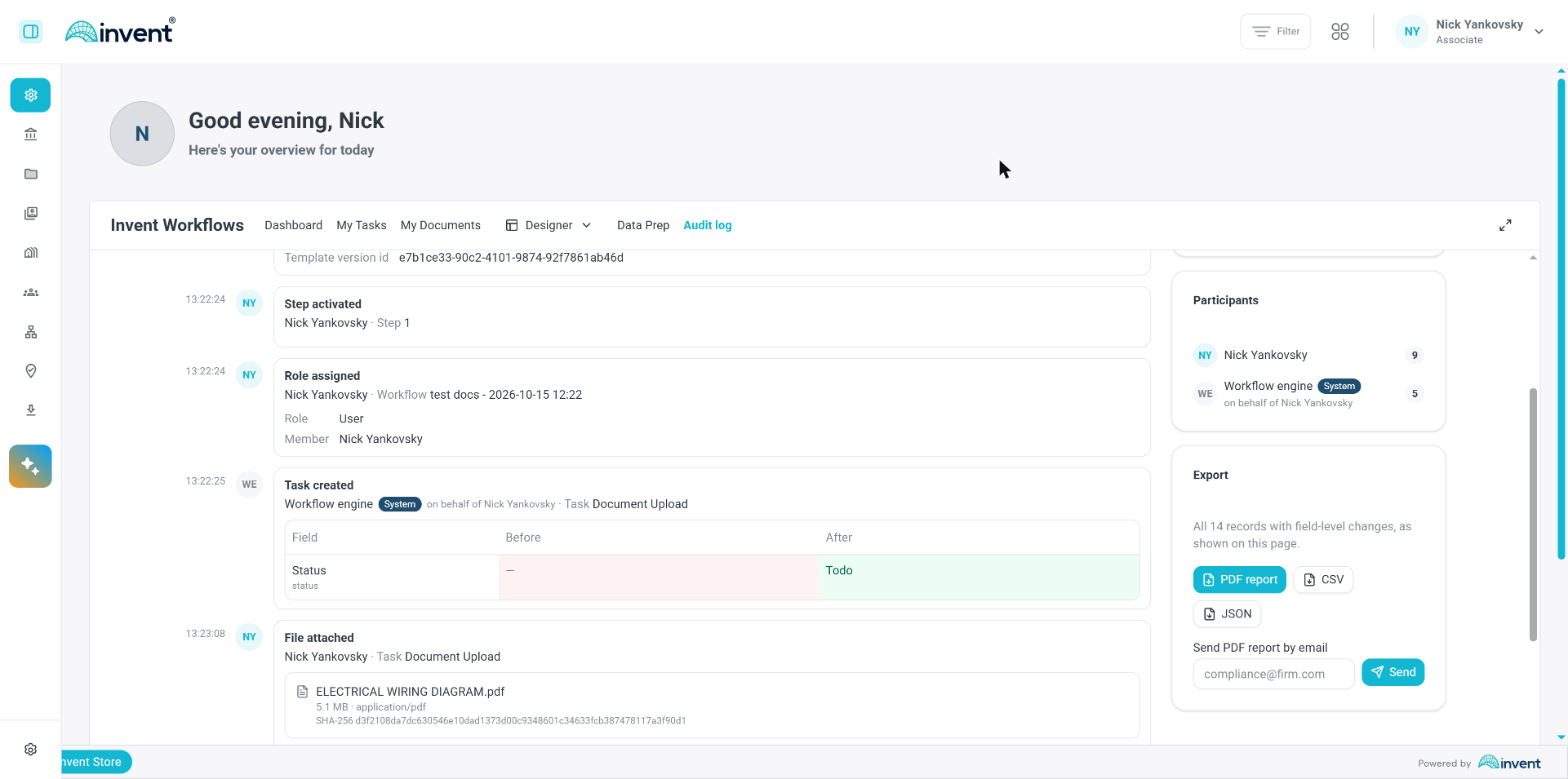
There is a new Audit log tab. It holds a record of every change, written at the moment the change is made. The record and the change are saved together, so a record cannot go missing. Nothing can edit or delete one afterwards.
A record names the person, the time, what they changed, and each field that changed, with its value before and after. A refused attempt is recorded too: what was asked for, which permission was missing, and why it was refused. A discussion message is recorded with its text and the people it mentioned. A file is recorded with its name, its size and a fingerprint of its contents, so you can show later that the file is the same one.
Reading the log is itself recorded. The page says so.
An administrator sees everything, under Change log. An auditor sees By workflow and nothing else in the product. Auditor is a new role, and it is given out the same way every other role is. Someone who is a member as well as an auditor keeps their usual tabs.
Test runs are in it too. A workflow launched from a draft template is marked Test run. It still uploads real files and still calls other systems with real logins, so the auditor is shown it. The list can leave those rows out.
Screenshot — a workflow's audit trail, with the Export card beside it
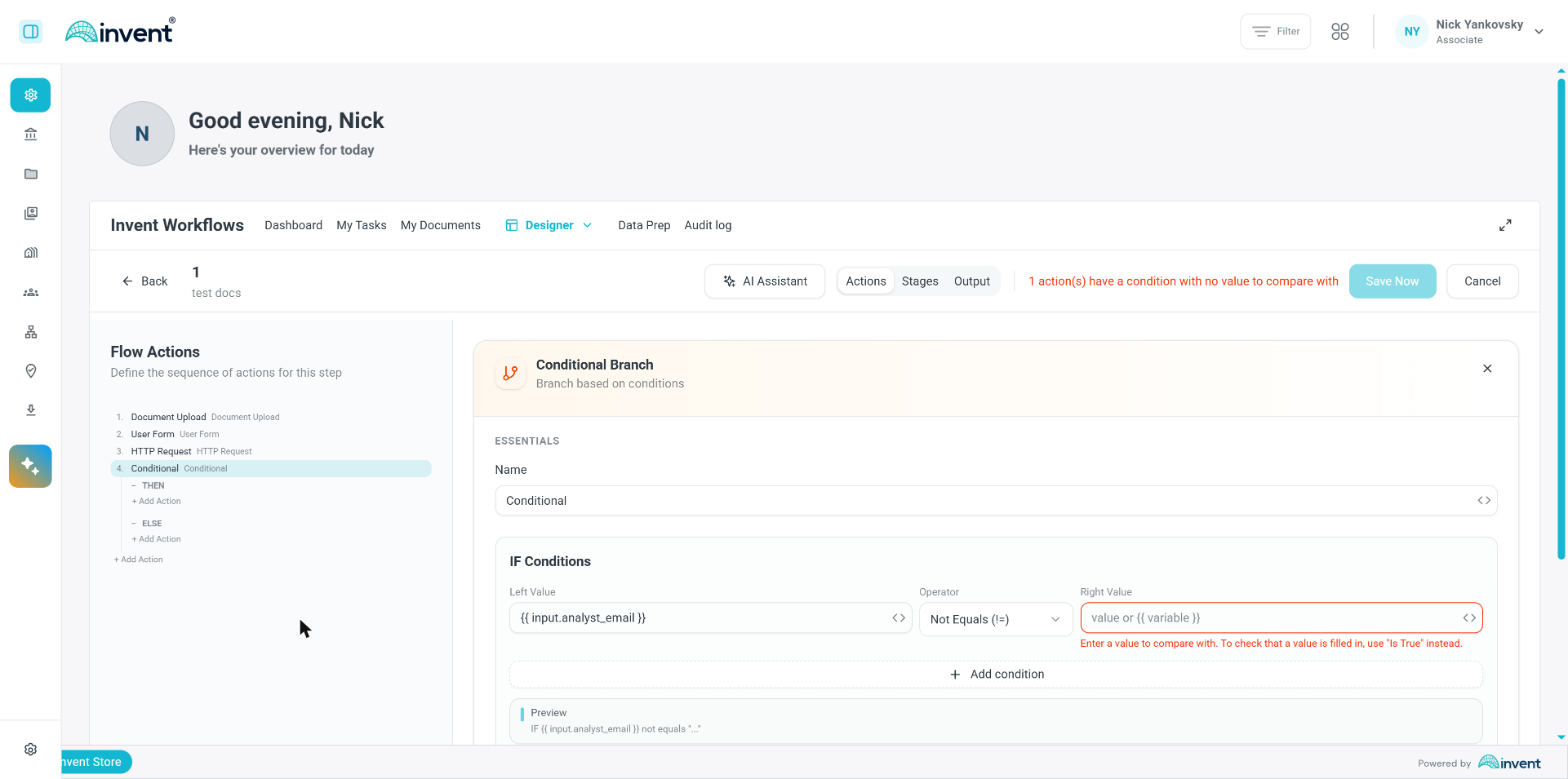
A condition with no value to compare with will not save
An operator like Equals, Not Equals, Contains or Starts With needs something on the right. A new condition row starts empty, so leaving that field untouched was enough to save a broken flow. The step then failed every time the condition was reached.
Save refuses them now. The editor outlines the row in red, says what is wrong, and keeps Save switched off. The same rule applies everywhere else a template can be written, so a blank one cannot get in by another door.
This covers the conditions on a Conditional Branch, a loop, a switch and an HTTP poll. A template you already have with a blank value will not save until you fill it in. It already failed at run time whenever that condition ran.
To test that a value was filled in at all, use Is True. It takes nothing on the right. For a number, use Is Not Null instead, because Is True reads a zero as empty.
Screenshot — a condition row flagged for having no value to compare with
Some task forms have to be launched again
A lookup that keeps the whole record can say how each option reads, and which fields it fills in. Both are written as {{ }}, and the form works them out as you use it.
The server was getting to them first, when the task was created. It did not know those names, so it emptied them. Every option then read like Sleeve - · AUM -, with no values anywhere. The designer preview looked right the whole time.
They are left alone now. But a task created before this release keeps the emptied text. Launch the workflow again to get a form that works.
Main changes
| Every change is recorded | A new Audit log tab holds every change to a workflow, task, discussion and template, with the fields that changed and their values before and after. Refused attempts are recorded too. An auditor role reads any workflow's trail and nothing else. |
| A workflow's record as a file | Download one workflow's whole record as a PDF to read, or as a spreadsheet or data file to keep. Or send the PDF to an address. Every download and every send is itself recorded. |
| Replies in a discussion | A message can be replied to, one level deep. Replies sit under their message behind a "N replies" toggle, so an answer no longer lands at the bottom of the list. |
| A card says where the workflow is | A dashboard card used to show only the stage name. It now reads like "3/5 Compliance & Legal › Contact intake +1": which milestone, which step is running, and how many others are running beside it. |
| The Invent Workflows Library is switched on | The page for solutions Invent maintains is in the Designer menu. It is empty for now, and says so, because nothing has been published to it yet. |
| A condition with no value will not save | A condition whose operator needs a value could be saved with that value empty, and the step then failed every time. The editor flags the row and Save stays off. |
| Query parameters on an HTTP call | The editor can write them, the Test button sends them, and the run view lists them. Until now they were invisible in the panel, so a call tested against a different URL than it ran against. |
| Who completed a task | A later task can be given to whoever did an earlier one. The configured assignee is the wrong answer once a task was reassigned, or given to a group. |
| A step's run view opens faster | It used to fetch every action's settings, results and recorded data at once — on every refresh, and every three seconds while the step ran. It fetches the shape of the flow first, then only the action you click. |
| Lookups follow the record you came from | Opened from an account, a form can fill in that account's advisor. Opened from a client, it can fill in the household and the advisor. A new lookup finds one client's phone number of one kind. |
| Lookups inside a repeating group | A lookup in a repeating group read the form instead of its own entry, so it searched on a blank or on someone else's answer. Auto-fill never fired at all. Each entry stands on its own now. |
| A connection picked on the launch form | A template with three logins to the same system no longer needs three templates. The credential can be filled from a launch field, and every action in the run uses the one that was picked. |
For the administrator
The change log
- Everything, in one list. Open Audit log → Change log. It covers the last 24 hours, 7, 30 or 90 days, or a range you set of up to 93 days.
- Four counters sit above it: records, denied attempts, failed attempts, and how many people were involved.
- Filters for who acted, what they did, and how it ended — succeeded, denied or failed. A search box covers the person, the thing they changed and the workflow.
- A row opens the record. Who acted, and on whose behalf. The fields that changed, named as the screen names them, with the old value in red and the new one in green. Any message or file. For a refused attempt: what was attempted, the missing permission and the reason. Below that, the address and browser it came from, and the record exactly as it was stored.
- A message names its discussion. A record reads "posted in Workflow discussion", or "posted in Task discussion · KYC documents". Records written before this release have no task name and read as "Task discussion".
One workflow's trail
- By workflow lists every launched workflow, whether or not you are a member. Filter by template, by status, by name or number, and by whether test runs are included.
- The workflow's page carries its header, its trail grouped by day, and a summary with every participant and their denied and failed counts beside them. Records load fifty at a time, oldest or newest first.
Exporting it
- Three formats. PDF report is the one to read: the header, the participants, then every record grouped by day as the page shows it. CSV opens in a spreadsheet, one row per record. JSON is for feeding another system.
- Or send it. Type one address and press Send. The PDF goes out as an attachment, from your tenant's own sender.
- It is recorded. Each download and each send appears in the change log, with a fingerprint of the file beside it. That is what lets you show later that a copy has not been altered.
- Limits. A PDF holds 5,000 records, the other two 10,000. Beyond that the report is refused, and the message points you at the formats that can take it. One send per person every thirty seconds. The attachment has to stay under 10 MB.
- Admins and auditors only. A member of the workflow cannot download or send its report.
The Invent Workflows Library
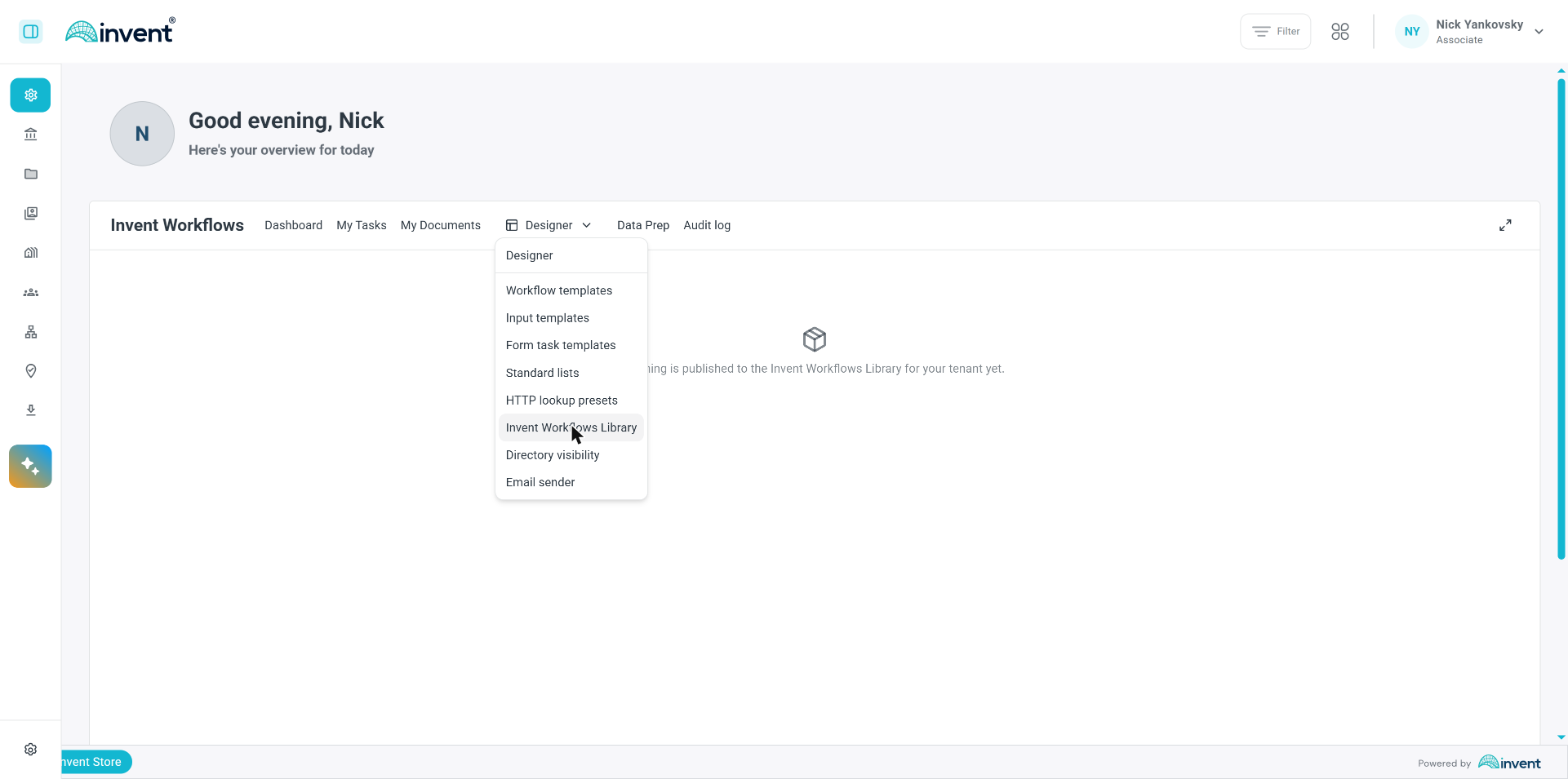
- It is in the Designer menu. The page for browsing and installing solutions Invent maintains was built for 6.0.0 and switched off. It is on.
- It is empty, and says so. "Nothing is published to the Invent Workflows Library for your tenant yet." Nothing can be published until the platform side is configured. Sealing a template works today, as it did before.
- A template installed from it carries a banner naming the library.
Screenshot — the Invent Workflows Library in the Designer menu
For the workflow designer
Query parameters on a request
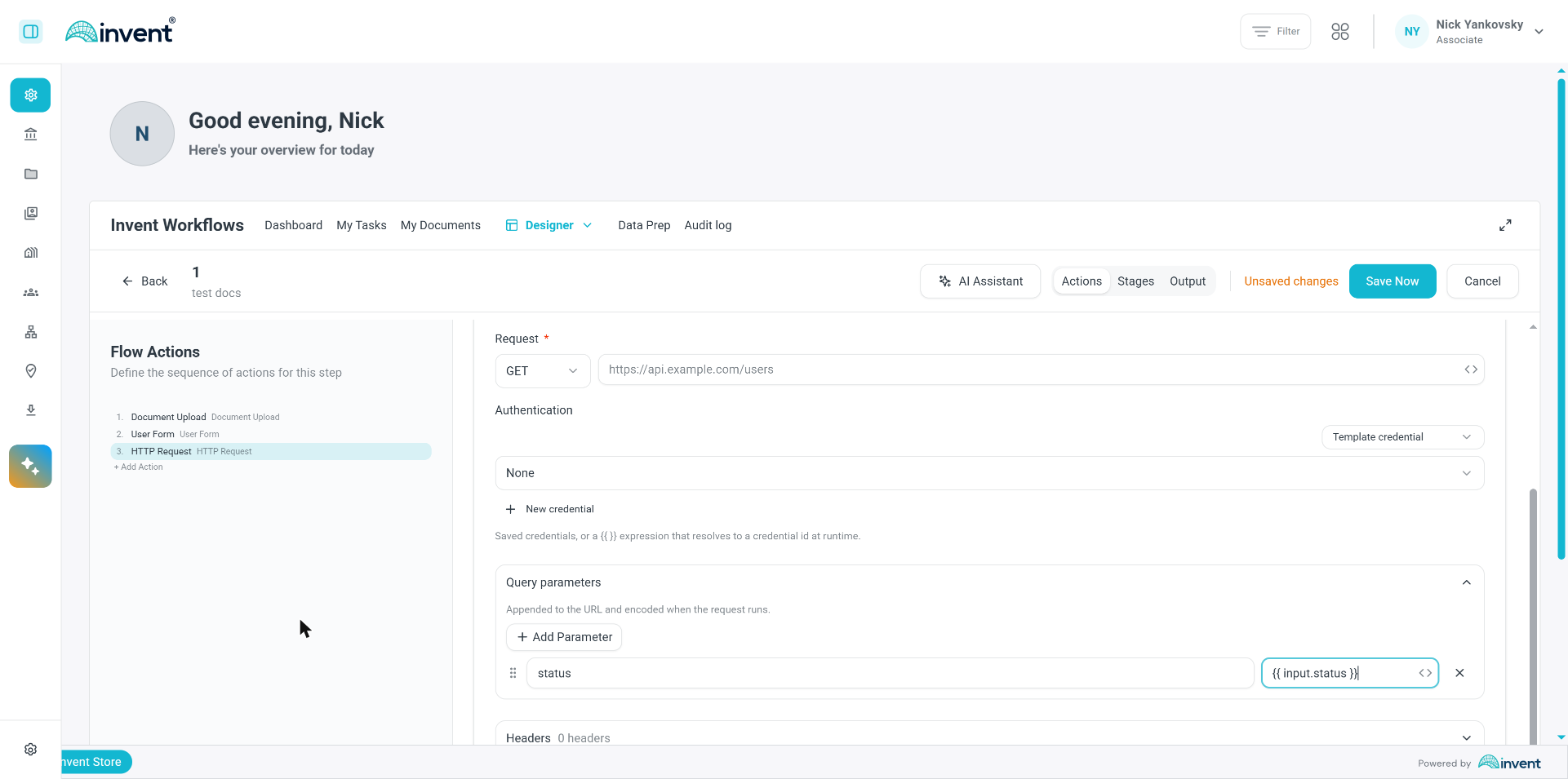
- A Query parameters section sits under the credential, on the HTTP Request action, on the typed connectors, and on the request inside an HTTP poll. One row per pair. A value takes a
{{ }}expression. - The Test button sends them. It used to send the method, the URL, the headers and the body, and nothing else. So a template written outside the editor was tested against a different address than it ran against. One Jira search, tested without its query, came back refusing to search everything at once.
- The run view lists them, with their values filled in, next to everything else the call sent.
- A row with no name is dropped, because the engine needs a name for each one.
Screenshot — query parameters on an HTTP Request action
Who completed a task
- Completed By is offered beside Task ID on every task — a form, an approval form, a document task, a time slot. It is the person who submitted it, which is not always the person it was assigned to.
- It is in the action's parameter picker and in the template-wide list. It is also in the step output mapping, which is how a later step reaches it.
- A task completed through a public link has nobody to name. The next task is created unassigned, exactly as a cleared assignee leaves it.
A connection chosen when the workflow is launched
- Template settings → Credentials. Each credential is either a connection of this workspace, as before, or picked on the launch form. Choose the launch field that carries it, or write the expression yourself.
- Every action in the run uses what was picked. The choice is frozen at launch, so a run cannot change connection halfway.
- The launch checks it. The Connections panel judges the connection the entered values name, not a static binding. A launch that names nothing is refused by the name of the credential.
- Export and import keep it. An exported template keeps the expression and drops only a bound connection id. An import asks for a connection only where one is needed.
- On a sealed template the choice is locked, and a bound connection stays editable. A single-action Test has no launch input to read, and says so.
Lookups
- A form can follow the record it was opened from. The advisor, household, client and account lookups now narrow to the page you came from. From an account page, the advisor lookup offers that account's advisor. From a client page, the household and advisor lookups offer that client's. From a household page, the client and account lookups offer its members and its accounts.
- Nothing changes for a field that is not bound. An unbound lookup lists everything, as it always did.
- A phone number of the right kind. A new Client phone lookup takes one client and one kind of number — mobile, home, work. The client grid joined every number into one untyped string, so a form asking for a mobile could not get one.
- Inside a repeating group, each entry stands alone. A lookup read the top of the form instead of its own entry. So it searched on a blank, or on another field of the same name. A binding to a variable was dropped. Auto-fill never fired. Picking a value in the third entry now fills the third entry, and clearing it puts that entry back to empty.
Smaller things in the editor
- Credentials edited on the Settings tab are saved. A credential added there was lost on reload, with no message. The editor saves everything on its own, and this was the one field it did not notice had changed.
- A credential the published version uses cannot be removed. Its delete button is off and the row says why. The server was already refusing it, and every later save resent the refusal.
- A JavaScript action whose input is one expression opens. The panel broke, and showed an error in place of itself, whenever the action's input was a whole
{{ }}expression rather than a list of values. That is a perfectly good way to write it, and templates written outside the editor use it all the time.
For the person doing the work
Replies in a discussion
- Reply sits on a message. The box you write in turns into a reply, with a line above it naming who you are answering and a Cancel beside it.
- Replies sit under their message, behind an "N replies" link. They load when you open it, twenty at a time.
- One level only. A reply cannot be replied to, so a discussion never nests deeper than that.
- A deleted message with replies stays. It reads Message deleted and keeps its author and time, so the answers under it still make sense. Its text and its mentions are gone.
- Delete is hidden on a message that is still being sent, and undoing a failed delete puts the message back where it was.
Where a workflow has got to
- A card says which milestone and which step. It reads like "3/5 Compliance & Legal › Contact intake +1". The "+1" counts the other steps running at the same time.
- A failed step still marks the position, because that is where the work is stuck. The card shows it as blocked.
- A finished or cancelled workflow has no position, and the card falls back to the stage name, as it did before.
The run view of a step
- It draws the flow first, and fetches only the action you click. It used to fetch every action's settings, results and recorded data at once — on every update, and every three seconds while the step ran.
- Nothing looks different. Iteration rows, approver rows and their labels come out exactly as before.
- A large response is back. One too big to send with everything else simply vanished from the panel, and a large request showed the unfilled template instead of what was really sent. Each is fetched on its own now and shown where it belongs.
- The panel keeps up. A refresh used to leave it showing whichever row happened to be in that position before. An action you picked inside a loop now follows to the loop's first pass once it runs.
Smaller things
- The member filters list people. On the dashboard, All Members and Created by were full of step names. There was one entry per webhook callback and per public-form invitation, repeated once per workflow. The real people were buried. Those entries are gone from the two filters. Their names still show up everywhere else they are used.
- A task that would not complete, completes. A form with a conditional section, filled in from an earlier pass, was refused with "not defined in the schema" — naming fields the form never sent. Those values arrived with the prefill, from a section that is hidden this time round. They are accepted and dropped, as they always should have been.
- Formatted text in a form reads the same everywhere. A heading came out the size of a page title, in the middle of a form. Such a field sat in a grey panel of its own. A table came out as rows of
|characters. A nested list had a blank line around and between every item. On the portal, a full-width section wrapped at about half the width. One piece of code draws all of it now.
Data Prep
- One row per workflow on the case Workflows tab. The columns are Workflow, Status and Action. A row says who launched it and when, where it has got to, and offers one thing to do: Launch, Fix data, Open workflow or Open. A row that is not ready names the fields in the way — "Missing: …" when they are empty, "Fix: …" when a value is wrong.
- The ⋯ menu holds the rest: launch another, earlier runs, the inputs used at launch, and the binding's settings.
- The launch dialog is short. It used to list every value the workflow would start with — about 160 rows on a real binding, fifteen screens of scrolling. It asks one question now. Those values are still there afterwards, under Inputs used at launch.
- The case follows its workflow. A case open on screen refreshes as its workflow moves to another step, finishes or is cancelled. Before, it kept showing whatever was true when you opened it.
Assistants
Most of this is about templates written through the Workflow MCP, which is how some customers build them.
- The assistant knows how to read a variable. It was writing
{{ variables.decision }}, where the right form is{{ variables("decision") }}. The wrong one does not fail — it renders as nothing, so a routing condition silently never matches. Its own reference taught it the wrong one. - It knows where a task's answers live. They are under
data.fields, notdata. Readingdatagave null, every time. - Save refuses both now. It also refuses three more mistakes. Reading an action by its id instead of its name. Reading an action that is not in that step at all. And reading
datafrom something that is not a task. We found thirty-six such reads across our own templates. - A field that names a client, account, household or advisor now has a recipe. Written as plain text, such a field opened empty, and the workflow was never linked to the record. The record's Workflows tab then never listed it.
- Editing a task form keeps the rest of the task. The assistant was rebuilding the task from scratch on every edit, dropping its assignee, due date, banner and layout. It also renamed the action, which quietly broke every expression reading its result.
- The assistant says when an edit is not live yet. An edit to a published template goes to the working copy, and launches keep running the published version until someone presses Publish. It now says so every time it saves. Not knowing this is what caught a customer out.
- The assistant cannot delete a template. No screen in the product deletes one, and the assistant should not be the exception. Asked to, it offers to archive instead.
- The assistant can publish and submit again. Both used to come back with a plan and wait for someone to approve it — on a page that nothing in the product could open. So every publish this way simply stopped there. They go through now, with the same permissions the person has, and they say plainly that it cannot be undone.
- A refusal says what was wrong. A bad value buried inside a larger one came back only as "an argument could not be read". The answer now points at the exact value. And an assistant that sends the same refused request again is told it is repeating itself.
- A form that would not save now saves. A select with a data source inside a repeating group was refused as an internal error, whenever the source's type was not written first. That was 49 failures in a fortnight for one tenant, whose assistant told them to contact support.
Behind the scenes
- Large values are kept out of their rows. Some systems return a document inside their answer, as text. That answer was then carried around whole: in the stored row, in every expression that read it, and in every reply. A few megabytes was enough to run the worker out of memory. Anything over 256 KB is now kept to one side and put back whenever something reads it. Template authors, and anyone reading a run, see exactly what they saw before.
- An earlier attempt at this was withdrawn. In 6.1.0 a large response was moved aside but not put back, so every template that read it broke. It was taken out the same day. If a step ran in that window and its response is missing, run that step again.
- A broken output mapping fails its action. It used to be logged as a warning while the action reported success, so the value simply was not there and nothing said why.
- An expression loads only what it reads. Every action used to load every other action's output before it ran. It reads one action's outputs the first time an expression mentions it.
- Reading a flow costs less. The shape of a step is sent without any of the values in it, and a single action's detail is sent on its own. Anything over a megabyte is fetched by itself rather than inside everything else.
- The workflow list serves two more dates: when the workflow was last updated, and the earliest due date among its open tasks. The due date can be filtered and sorted on, and the query behind it got an index to match. The widget does not show either one yet.
- The workflow services call Directory and Audit Trail directly, with their own token, instead of going through the Dapr sidecar.