
Appearance
6.0.0 — Binding scripts, attachments and packages
Released October 6, 2026 · Backend 6.0.0 · Widget 5.6.2
A Data Prep binding is now one script, not a long list of mappings. You get a table for the simple rows, code for everything else, an AI draft to start from, and a dry run that shows the cell behind every value.
The notification rules you set up in 4.2.0 start sending. Until now, none of those emails had ever gone out.
An email a workflow sends can carry the files the workflow holds. A field can be shown or hidden based on what an earlier step returned. Case data is on one page now, with a searchable list of groups and one count of what needs attention. Re-importing a file makes a new batch instead of quietly reopening an old one. And task forms written by older editors open again.
Three things work differently than before. Please read those first.
Three changes to know about
You have to write every Data Prep binding again
A binding used to be a list: one mapping per workflow input. On a Case Type with 200 columns, that list was too long for anyone to follow. A binding is now one script. It reads the case and returns a value for each input the workflow takes.
The upgrade does not convert what you had. Every binding is switched off and left empty. Batches lose their pin. Readiness is cleared. A launch that was queued against an old binding will not run — better that than starting a workflow with the wrong values.
Those Case Types cannot launch until someone writes the script. You do not have to write code to do it. See Data Prep below.
Notification emails start arriving
In 4.2.0 you could add email rules to a template: tell someone when a task changes hands, when they are mentioned in a discussion, when a workflow finishes or is cancelled.
None of those emails were ever sent. Not on any environment. The rule was read. The notification was saved. The email was queued. Then the part of the worker that empties that queue was turned away by the database, every five seconds, with nothing on screen to say so.
They send now. If you wrote rules while they were quiet, read them before they reach anyone. A rule that emails a whole group has never once looked like a mistake.
Send Email actions in a flow, and due-date reminders, went out all along. They do not use that queue.
The widget's default look is Soft
There are two looks: Sharp and Soft. A widget whose settings had been saved looked Soft. One that had never been through the settings screen looked Sharp, which nobody had chosen. Every widget is Soft now, unless its own settings say otherwise.
The widget also stopped rendering inside a shadow root. Saving anything through the settings schema used to switch that on. Now the portal's styling reaches the widget the same way it reaches the rest of the page. The Developer section says so, instead of offering a switch that no longer does anything.
Main changes
| A binding is one script | One script fills every workflow input. There is a table view for the simple rows and a code view for the rest. AI can write the first draft, and you can test it on a real case before anyone launches. |
| Notification emails are delivered | The rules added in 4.2.0 saved every notification and sent none of them. They send now. |
| Emails can carry files | A Send Email action can attach files the workflow already holds: a form upload, a document task, a file an earlier action saved. Nobody has to email them by hand afterwards. |
| A visibility rule can read a variable | The value a rule compares against can be a variable. So a field can appear only when an answer is in a list an earlier step returned. |
| Case data on one page | A case's groups are a searchable list down the side. The case opens on the first group with a problem, and one number says what needs attention. |
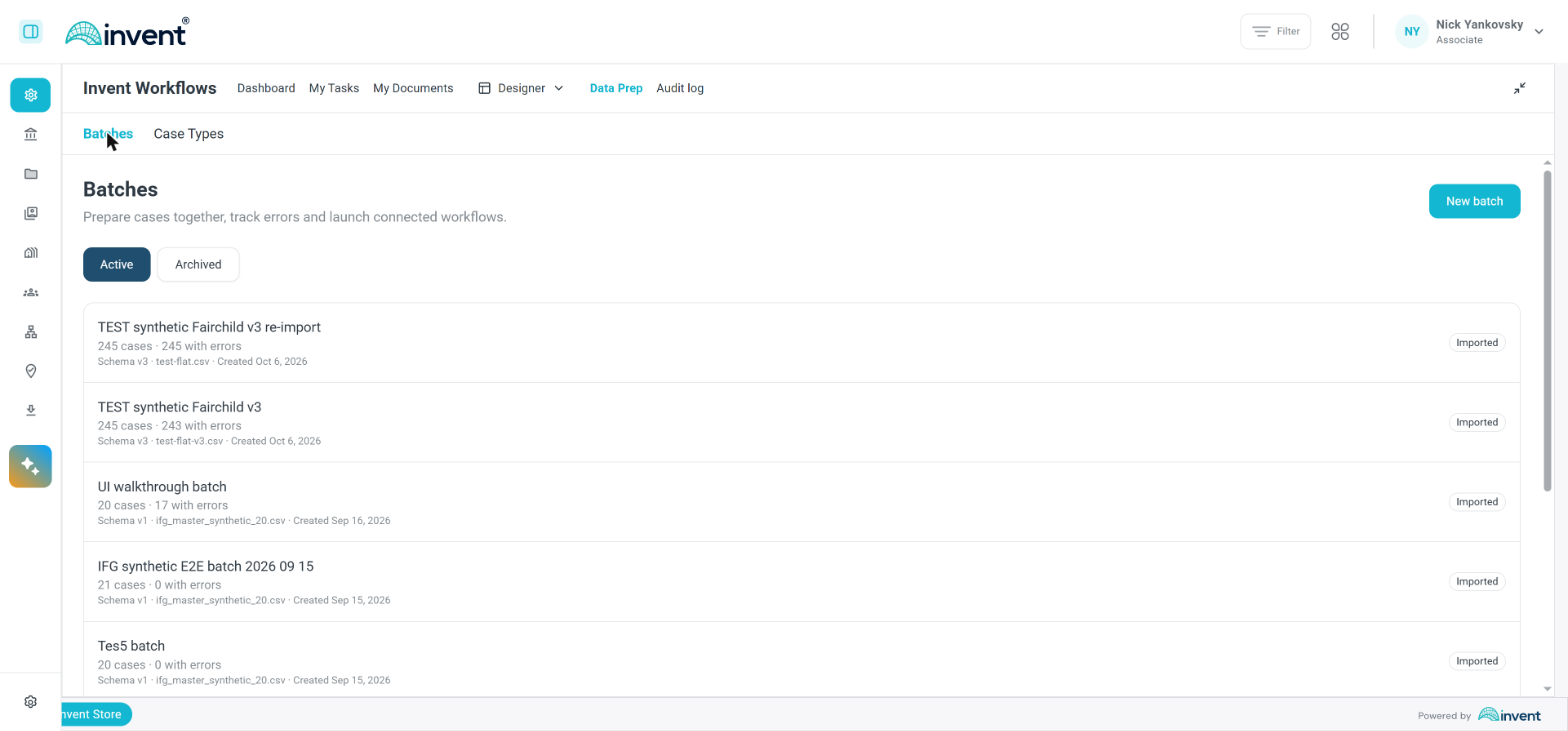
| Re-importing a file makes a new batch | Uploading the same file again used to reopen the first batch made from it — old schema version, old name, often archived — so the new batch looked like it had vanished. Every upload is its own batch now, and the dialog lists what was made from that file before. |
| Solutions Invent maintains | A template built by Invent can be sealed. You run it, name it, file it and choose who may launch it. You never hold its definition. |
| Task forms that would not open | Forms saved by older editors are stored one way now and repaired in place. A field bound to a path that can never hold anything is refused when you save, instead of being found by the person doing the task. |
| Files a flow saved are filed properly | A file written by a Save File action named no workflow, so any filter on one missed it. It names the workflow that saved it. |
| Dashboard counters count the whole list | Active, Done and Blocked were counted from the rows on the page you were looking at. On any list longer than one page, they disagreed with the total beside them. |
| Publish right after a save | Saving a flow and pressing Publish left the template saying "Unpublished changes". You had to press Publish twice. |
For the workflow designer
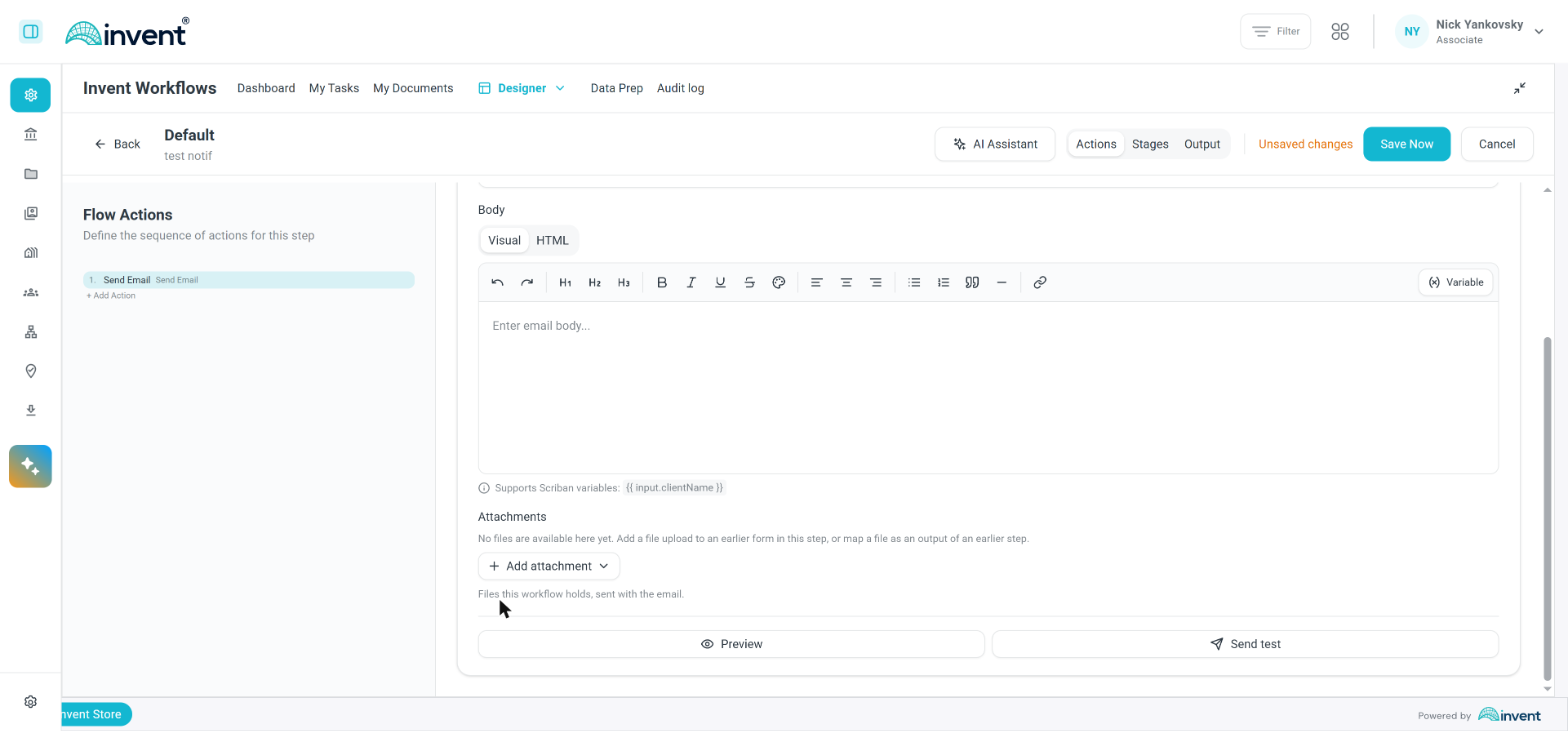
Attachments on an email
- Add attachment, under the body. The Message tab of a Send Email action lists the files that action can reach, by name: uploads from a form, uploads from a document task, the result of a Save File, files captured by an earlier action in the same step, and earlier steps' outputs that point at a stored file. A file captured inside a step is gone when that step ends, so a later step is not offered it.
- Anything else is an expression. Custom expression… takes one whole
{{ }}expression. A list of files is flattened. An entry that resolves to nothing is skipped. - It sends everything, or it fails. The action reads each file and counts the bytes as they stream, rather than trusting the size that was declared. The limit is 10 MB, which is what the mail provider allows. If a file is missing or too large, the action fails and names it. You never get half an email. A blank optional upload is skipped and the email still goes.
- The test email does not carry attachments, and says so.
Screenshot — Attachments, under the body of a Send Email action
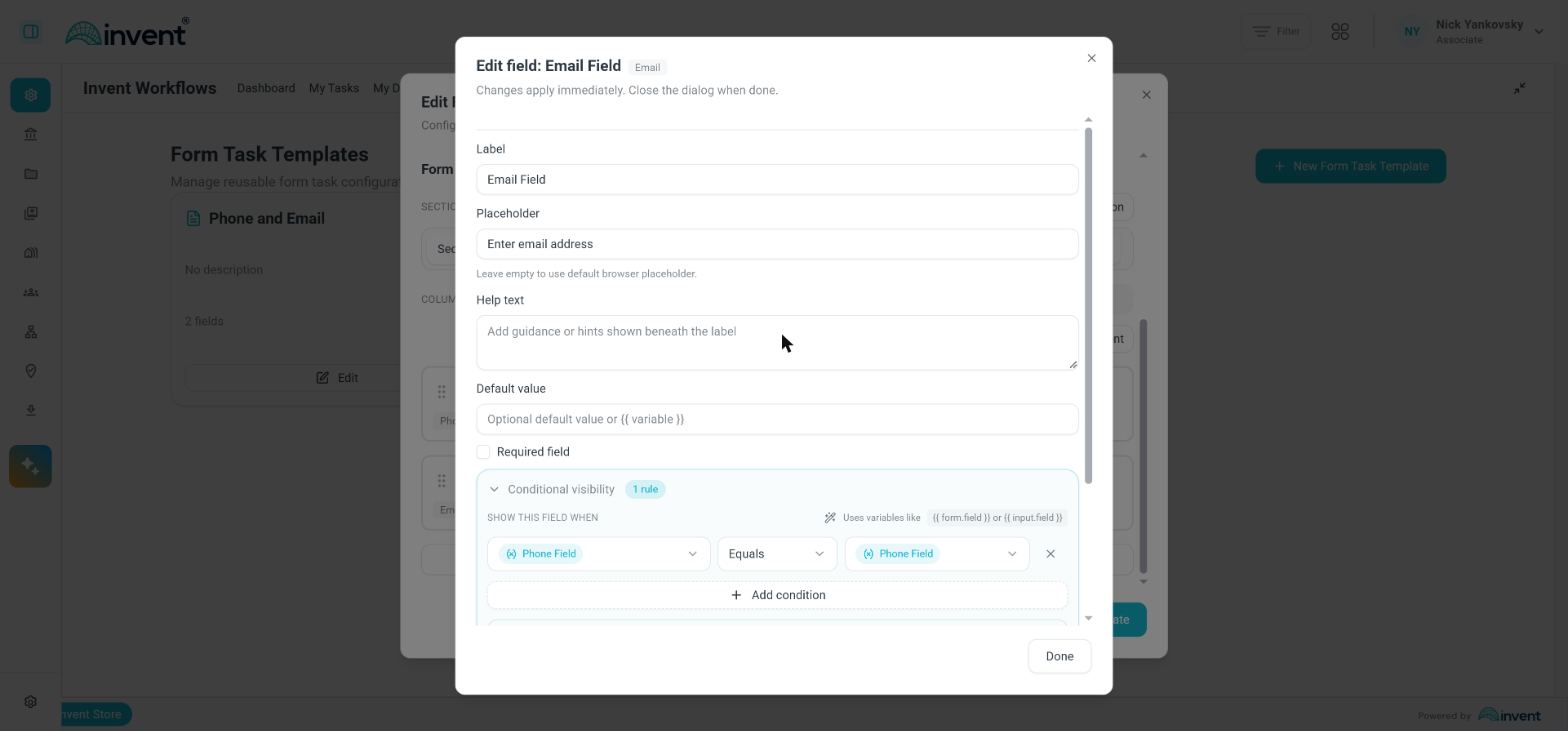
A visibility rule can compare against a variable
- The value side takes a variable. Beside the value there is now the same variable picker the left side has. A value that is a single reference shows as a chip. Clear it and you are back to typing. Change the operator and the chip stays.
- "Is one of" needs no new operator. Put the list on the left:
{{ actions("lookup").codes }}contains{{ form.country }}. - Both sides are checked as you build. Self-references, unknown fields and cycles are caught on either side.
- A reference that could never work is reported. Everything except
{{ form.* }}is worked out when the task is created. The live form resolves a form reference only as a whole field path. SoCode: {{ form.x }}, or a filtered one, would never have worked. The editor tells you now, instead of leaving it to run time.
Screenshot — the value a visibility rule compares against, taken from a variable
Templates and forms
- Publish right after a save works. The check for "has anything changed since the published version" depended on the order the fields came back in. Publishing also moved the pointer before the save had finished choosing which version to keep. One save, one Publish.
- One spelling for a stored form. Three writers wrote a task form's field types three different ways. The form editor read one of them, showed the others raw, and dropped a Document binding or an upload rule when it saved such a form. Everything is stored one way now. What is already stored is repaired. The editor no longer depends on that repair having run.
- A read that can never find anything is refused at save. A Document field bound to a path that holds no files. A Document bound to a task in another step. A Save File handed a whole list of uploads where one file is expected. The save names the path that works, instead of letting the person doing the task find an empty field.
- The dry run and the save run the same checks. Validating a template without saving it used to run fewer.
- A broken flow is reported, not an error. Three cases — a step whose stored flow has no actions, an action with no type, a flow that validation read straight past — gave an internal error or silence. They are reported like any other problem with the flow.
- A file upload is offered at the path that works. The variable picker offered a form's file-upload field under a path that is always empty. So a Document field bound from the picker showed "No documents" while the preview looked right. It offers
files.<field>now, the path the engine fills. - A Document field has its label. It used to render as a bare file list, with no label and no description. An empty one read "No documents", with no hint of which document was missing.
- Smaller things in the editor. A failed save is reported once, not three times. An action whose parameters fail suggests the expression it expected. The step reference offered for a flow-wide value is the one that resolves. And a system action no longer carries an empty Submitted Data card.
For the administrator
- Sealed templates. A template built by Invent can be sealed. After that, nobody in the tenant is served its definition — not even a global administrator — and no edit to it is accepted. The banner across the top names what is still yours: its name, its folder, its tags, who may launch it, and launching it. An installed solution also keeps your own launch-authorization script. A template sealed in place does not, and the Authorization tab says which of the two you are looking at.
- The page for browsing and installing them is built, but switched off. It reads a registry that cannot hold anything until the platform side is configured, so it would only ever be empty. Sealing a template works today.
- The test email goes where you send it. Send test email used to go to whoever pressed it. It asks for an address now.
- You can see who your rules hide. A global administrator skips every directory rule. So a new rule hiding, say, a whole email domain looked broken to the person who had just written it — they still saw everyone. People an ordinary user cannot see are marked Hidden from users. Nothing else changed for admins: search, assignment and the people list still show them everyone.
For the person doing the work
- The counters above the dashboard count the whole list. Total came from the server. Active, Done and Blocked came from the rows on screen. So the four numbers disagreed with each other from page to page. Each one is counted across the list you are actually looking at, under the same filters. The header waits until it has all four, rather than showing real and placeholder numbers side by side.
- A stopped flow names the step. A flow held up by a failed system action — a Save File, an HTTP call — has no blocked task to count, so its card read "0 blocked tasks". It says "1 blocked step".
- A failed pass of a loop says why. An action inside a loop runs once per iteration. The reason it failed was only published for the definition, which a loop never runs. So every pass showed as failed with nothing beside it. The reason is on the pass that failed.
- A task's discussion opens from the workflow too. The Discussion tab of a task opened from the workflow page asked the server about the step's definition, not the task raised from it, and got nothing back. Opening the same task from My Tasks always worked.
- A file a flow saved names its workflow. A file written by a Save File action — a signed envelope pulled down by an HTTP call, say — was listed with no workflow against it, so any filter on one missed it. Files saved before this release are named correctly too. Nothing had to be migrated.
- Launch forms fill in your name on FlexMart portals. A launch field bound to
user.nameoruser.emailstayed empty on DAP4 portals. The widget assumed those portals had no way to say who you are. They do. - The form stopped showing through the buttons. On a short window, the form scrolled visibly through the strip under Previous / Save Progress / Next.
Data Prep
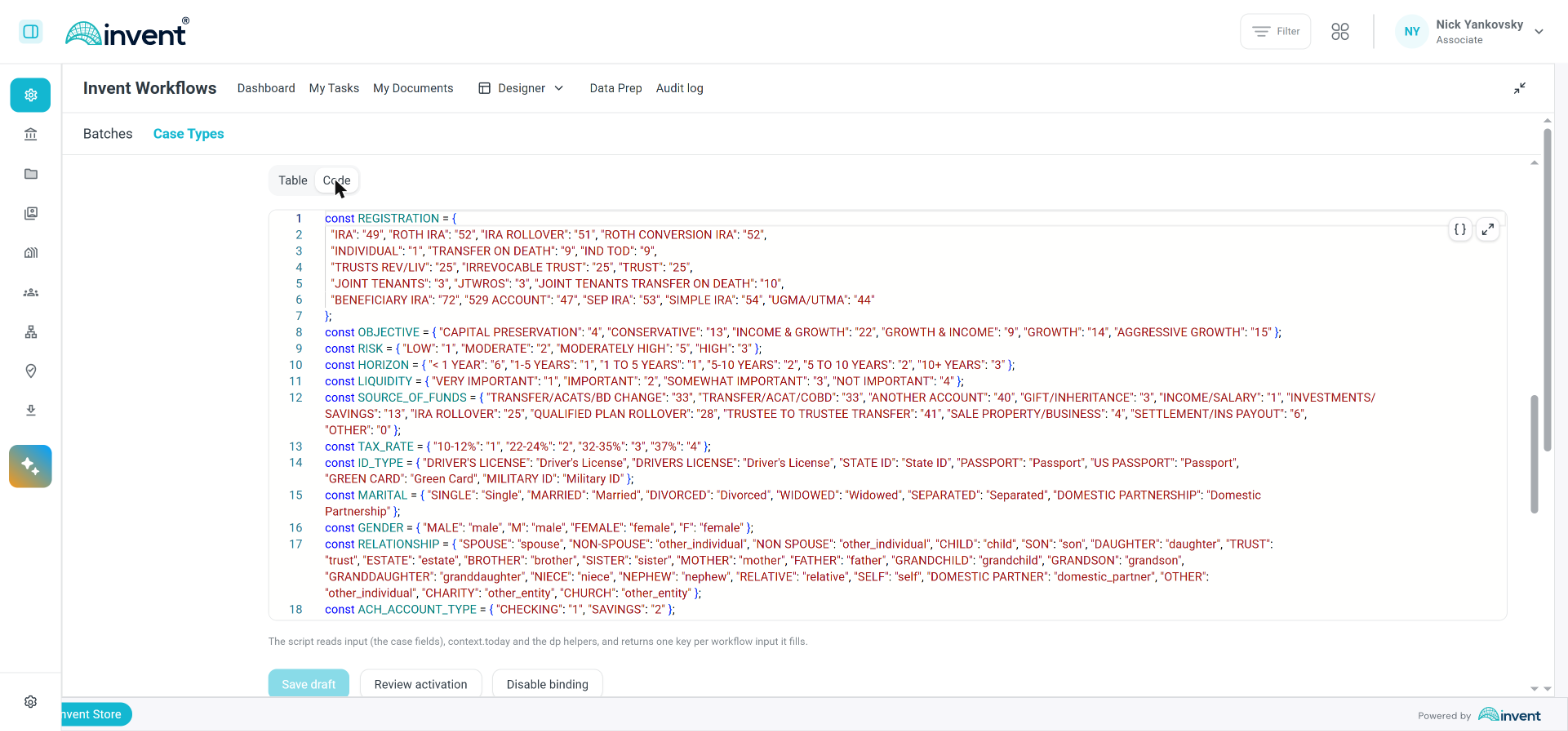
The binding, as a script
- One script, not a list. It reads the case and returns one value per workflow input. What it returns is the whole binding.
- A table view for the simple rows. One row per input. Each row is Don't fill, a case field (with a text format, a date format or a value map), a plain value, or an expression. Rows read from the script and write back to it. If the table cannot express your script, the script stays fully editable in the code view — it is not flattened to fit.
- A code view for everything else. It knows the shape of
inputanddpas you type, and marks the server's complaints on the line they belong to. - Generate with AI writes a first draft against a template version you pick. If it fails, what you had is left alone.
- Test it before anyone launches. The check panel is a dry run. With no case, it reports what does not fit. On one case, it shows what every input came out as, and links each value to the cell it came from. On a batch, it gives you a summary. You can set a date for the script to read as today, so a rule about a business day can be tested on the day that matters.
- The launch dialogs, the readiness panel and the revision history read the pinned revision's script, and link each input back to its cell.
Screenshot — a binding, as the script that fills every workflow input
The case page
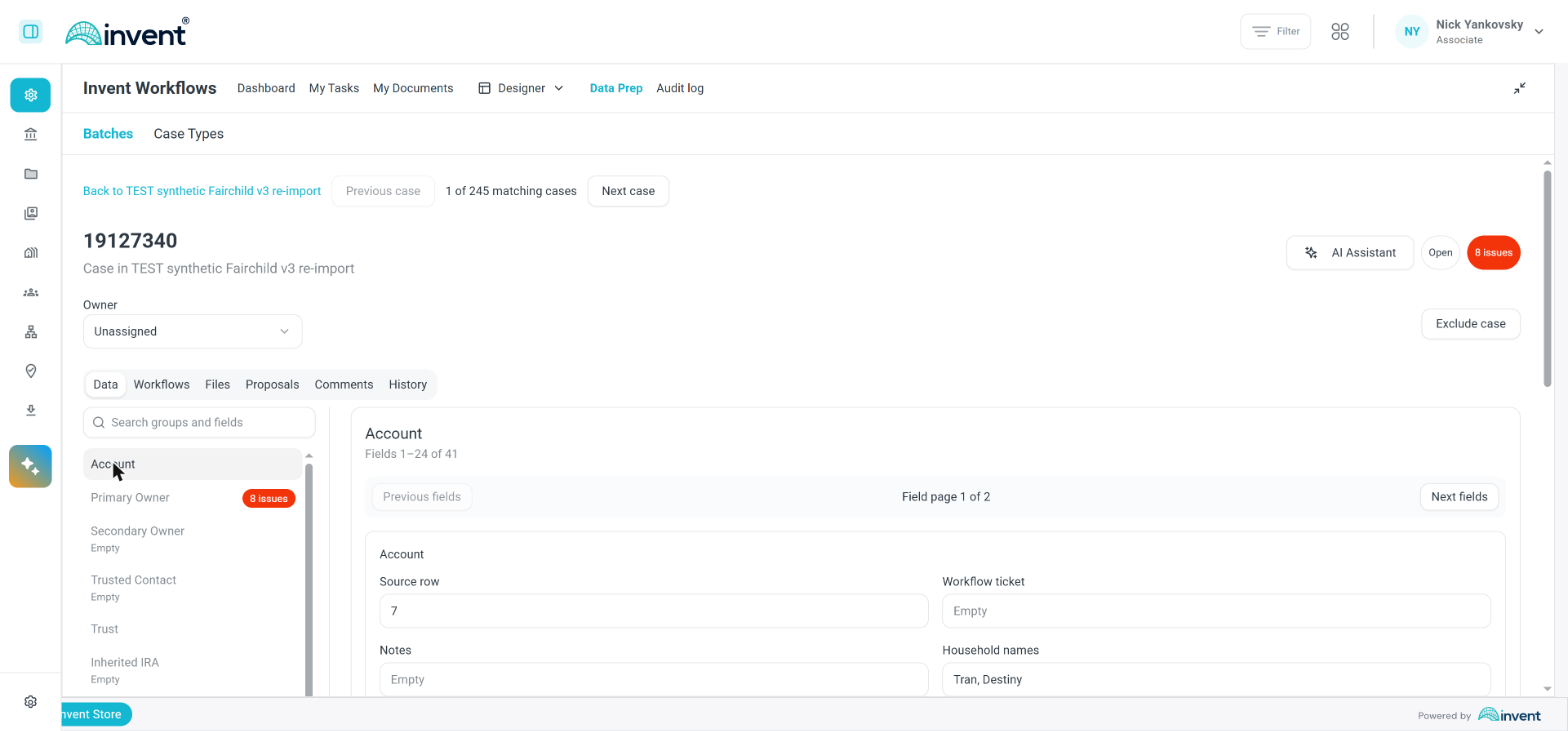
- Groups are a list down the side, not tabs. The rail lists the case's groups with the work beside each one. A search at the top filters groups and fields by name as you type. Phones get a compact picker instead.
- One number for what needs attention. It replaces "issues · missing". Hover it and the number breaks down: values not filled in yet, values blank in the file, other problems, warnings. Each line jumps to its field. The case opens on the first group with a problem, and fields with a problem are outlined.
- Required fields are marked with the red asterisk every other form uses.
- The issues badge in the batch header is a filter. "N cases with data issues" is a button. It is tied to the sidebar's With data issues row, and either one moves the other.
- The batch header names its Case Type, and links to that Case Type's Members tab — which is where you go to get a colleague added to it.
Screenshot — a case, with its groups down the side and one count of what needs attention
Importing
- Every upload is its own batch. Re-importing a file after publishing a new Case Type version used to quietly reopen the batch first made from those bytes: on the old version, under the old name, often archived. The new batch looked like it had vanished.
- The dialog says what came before. Once you confirm an upload, earlier batches made from the same file are listed: their schema version, whether they are archived, how many cases have changed since, and how many have already launched a workflow. That matters, because a new batch starts clean, and launching those cases again starts their workflows again.
- The batch list says more. Rows show the schema version, the source file and when the batch was created. A batch on an older schema version names the current one.
Screenshot — the batch list, with the schema version, source file and date on every row
Assistants
- An agent can look people up by name. Asked to assign the review task to a named colleague, an assistant writing a template had no way to turn that name into an id. It stopped and asked for one — an id the product never shows you. It searches the same directory the designer's people picker uses, with your tenant's visibility rules applied.
- A refused call tells the agent what was refused. A tool asking for something that does not exist, or something you may not see, only reported that the call failed. The agent could not tell a wrong id from a denial from a fault on the server, so it guessed. It gets the real reason now.
Behind the scenes
- A registry for packaged solutions. A solution is written in a vendor tenant. It is exported with every connection it uses turned into a named slot, published as a version that cannot change, and installed into a customer tenant as a sealed reference template. Launching one pins the version it runs. So moving a customer onto a newer one is a deliberate act, and anything already running finishes on the version it started. None of the publishing side is customer-facing.
- Connections never travel. A published version declares what it needs. The installation binds each one to a connection of the tenant's own. None of your connections are in anything that is published, and nothing about a package reaches the engine.
- Start-up migrations have their own timeout, and the backfill behind document uploads runs in one pass instead of slowing down as it goes. Both were cases where a deploy could stall on a large tenant.
- Agent and MCP code moved out of the shared projects. Tool names are spelled out where a parameter description mentions them, and two dependencies were raised past advisories.
- Every colour in the widget comes from a token, statuses included. So one setting restyles every surface that shows a status, instead of eight of them agreeing by hand. Nothing changed on screen: it was measured in light and dark across more than 900 screenshots.
- Dark mode reaches the surfaces that had no dark value, and the settings a widget accepts match the designs that are actually registered.